Summer: (n) That period of time between June and August where kids forget almost everything they’ve learned during the previous school year.
Right?! I mean, doesn’t it seem like that’s the case most of the time? LOL!
In our homeschool, in order to retain as much learning as possible, I like to continue some of our main subjects through the summer, subjects like math and writing. I’ve found that by doing a little bit here and there, through the summer months, we can keep concepts fresh and it’s not so difficult to jump back into school in the fall. To keep up on our math studies this summer, we’ve been trying out LearnBop for Families by LearnBop.
LearnBop
LearnBop is an online interactive math program for students in grades 3-12. Designed to personalize learning for students and boost their confidence, LearnBop is different from other online math programs due to its step-by-step solution guide to missed problems. It’s like having a math tutor right in your computer.
I received a 12 month subscription ($14.95 a month) to the LearnBop Single Student Plan. This plan is for one student but LearnBop also offers a Family Plan ($19.95 a month) for up to 4 students.
To begin LearnBop, you choose a “roadmap” to start out your student on. The roadmap can be a grade level or a particular subject you want your student to focus on. Subjects include: operations and algebraic thinking, number and operations in base ten, measurement and data, geometry, number and operations-fractions, ratios and proportional relationships, the number system, expressions and equations, statistics and probability, and functions.
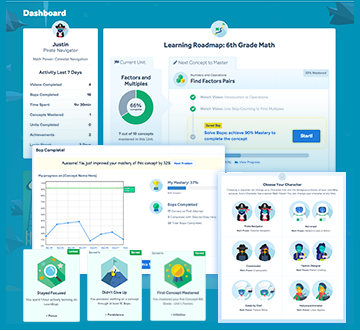
After choosing a “roadmap” for your student, the program is divided into smaller “units” that need to be mastered. Each unit features a warm-up, about three or more instructional videos, as well as “Bops”, which are the actual math problems.

As your student works through the units, the program keeps track of your student’s progress. Your student will need to achieve 90% accuracy to master a particular unit. If a student gets a problem incorrect, the program takes a little detour into the mechanics of the problem through step-by-step instruction. This is the math tutor-like part.
You can jump around throughout the program. You do not have to complete the units in order. Even the warm-ups and instructional videos are not required. If your student wants to jump right into solving the “Bops”, he can do that. However, the instructional videos provide the essential teaching and learning.
While working through the units, your student can earn different “awards” for their hard work and achievements. There are “awards” for not giving up, staying focused, mastering a concept, completing a roadmap, mastering 10 concepts, your first milestone, and many more.
Usage and Thoughts
I used this program with my 5th grade son, so I naturally chose the 5th grade “roadmap” as a starting place for him.
After logging into the program, I found that I had been provided with an account for myself as well as one for my son. I played around with my account a little bit and, although I didn’t use it much, I could have started my own roadmap and done some high school algebra or whatever topic interested me!
My son worked through the units according to his interest, as I didn’t give him any requirements on which unit to begin with. He needed a pencil and some scratch paper to solve the problems within the”Bops”. He especially enjoyed choosing the avatar and theme for his dashboard, a detective theme. The dashboard was a little busy for my son. He and I both found it a bit confusing.
My son started each unit, as the program suggested, with the quick warm-up provided. I thought that the warm-up was a type of diagnostic and would reveal what gaps my son had, if any. However, I couldn’t find the grades for the warm-up and I am still unsure how the warm-up affected his unit or relates to his “roadmap”.
The instructional videos were good at explaining concepts. We enjoyed those. The videos feature graphics to help illustrate ideas and I think the visuals really helped my son grasp concepts more quickly.


The math problems in the “Bops” were laid out well with lots of white space. Each question contained a hint, which was a really nice feature. Also, my son would get feedback after each question, so he knew right away if he had answered a question correctly or not.
We ran into a few little technical glitches here and there. For example, in the problem seen above, the entire problem was not showing. After reading the information in red, you are supposed to answer with either a yes or no answer, but obviously something was missing. Later I tried the problem again and finally the rest of the math problem did show up and we were able to answer the problem.
LearnBop contains a great deal of mathematical content. I think it has been helpful to my son. It’s been a good refresher course for him. However, because we did experience some technical difficulties, and my son did not enjoy using LearnBop, due to the busy interface, I don’t think we will continue using the program at this time. I think if the program was just a little more user friendly, the warm-ups did provide feedback and identify gaps, and the technicalities were dealt with, it could be a really good program.

Related posts:
