I’m so excited because I have a super fun review to share with you all today! Out of all the products we’ve reviewed over this past year, this is probably my son’s very favorite product review. And for good reason…
Have your kids ever asked to have their own email account and you kinda just shrunk thinking about the dangers of giving your child their own account? You don’t have to fear anymore with KidsEmail.org! My son has been emailing friends and family with the Annual Subscription from KidsEmail.org and has been loving every minute of it.
KidsEmail.org

I never thought I would let my kids have their own email account – at least not until they were in their 30’s or so. <grins> But seriously, have you seen the awful provocative ads that pop up on the sidebar of most email providers? It’s utterly disgusting. I don’t even want my kids in the same room with me when I have to check my own email because of the trash that pops up. But give my kids their own account? Um, no. Never. Not to mention the horribly inappropriate “junk” mail that comes through. *shudder*
Fortunately, my kids got to enjoy their own email account before they turned 30, thanks to KidsEmail.org. With this special email service, kids get to experience the freedom and joy that comes with having their own email account and parents get peace of mind knowing that their chidren are protected. There are no disgusting ads to worry about and no spam or junk mail will ever get through.
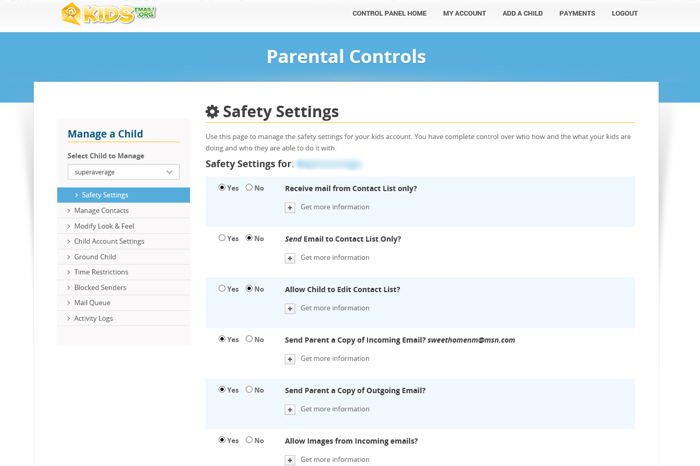
Part of what makes KidsEmail.org such a wonderful service is due to all the awesome parental controls that are available to parents.
Some of the settings that are available include options for:
- receiving mail only from people on your child’s contact list
- sending mail only to people on your child’s contact list
- allowing your child to edit their contact list
- sending parents a copy of incoming mail
- sending parents a copy of outgoing mail
- allowing images
- allowing links
- allowing attachments
- allowing language in received emails
In addition to configuring all these settings to your liking, you can also implement time restrictions, block senders, and receive an activity log of your child’s email activity. You can also take KidsEmail.org with you on your mobile device and even enable a GPS feature if you so desire.
Thoughts and Usage
My son has loved emailing family and friends from his own email account. He has been checking his email daily for the past several weeks and, bonus, he has been very motivated to compose letters and improve his writing skills! Besides the fun of creating and receiving emails, KidsEmail.org has been a great tool for encouraging good writing skills and grammar.
My son loves the drawing board feature where you can email drawings to friends. He’s also enjoyed attaching photos and sending smiley emoticons. The template options allowed him to change the background look of his email account, too. Many of the backgrounds seemed a bit babyish, but my son was able to find a couple of backgrounds that he liked.

Most of the time my son preferred to check his email on the desktop computer. The KidsEmail.org App for the iPad didn’t work very well. The window for viewing his email was too small to be able to see the entire email at one time and the text was teeny tiny. He had to scroll around inside the window and zoom in to be able to read emails on the iPad.
KidsEmail.org was easy for my son to use and he learned how to use the different features and folders quickly. We would both like to see KidsEmail.org add a way for us to see which emails have been replied to. It was hard to remember which emails had already been replied to and which ones still needed to be replied to. A “save as draft” feature would be really helpful as well.
I loved all the parental controls. I chose to receive copies of incoming and outgoing emails and only allowed emails to be sent and received from his contact list. I did allow images, attachments, and links because I trust all the people in his contact list.
My son had this to say about KidsEmail.org:
“I like having my own email account because I get to email my mom, dad, and other people. I also like it because I learned spelling, typing, and writing. It has plenty of sillies and all sorts of awesome things. I’m just eleven years old and I get to email my friends and family.”
KidsEmail.org has definitely been a fun experience for us! I love all the parental features and feel peace of mind knowing my son is safe while using his email account. My son loves the freedom of having his own account. It’s a win-win!
And, the best part? I get sweet little emails like this one from my son… <3

Related posts:
